Timing Diagrams Examples
Here we provide some examples of timing diagrams:
- Medical domain - Stages of Alzheimer’s Disease
- User Experience - Website Latency
Stages of Alzheimer’s Disease
An example of timing diagram of medical domain showing stages of Alzheimer’s disease. Alzheimer's disease (AD) is a a progressive, ultimately fatal brain disease that causes loss of memory and intellectual abilities. The cause of the disease is unknown. AD has no cure and is one of the leading causes of death in the United States.
For Alzheimer’s disease doctor may use a diagnostic framework with three to seven levels (stages). Progression through these stages may last from 8 to 10 years, and in some cases up to 20 years from the time neuron changes start.
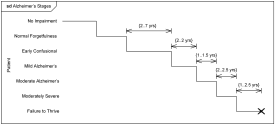
Example of timing diagram below shows timing for the seven stage framework. Note, that this is a UML diagram example and should not be considered as a medical reference for the disease. Medical details are provided here only to aid in better understanding of the diagram. Seven stage framework includes the following stages:
-
No Impairment, Normal State.
Memory and cognitive abilities appear normal.
-
Normal Aged Forgetfulness.
Half or more of the persons over the age of 65 experience subjective complaints of cognitive and/or functional difficulties, e.g. they can no longer recall names as well as they could 5 or 10 years previously.
-
Early Confusional, Mild Cognitive Impairment.
Problems with word retrieval, planning, organization, misplacing objects, and forgetting recent learning affect home and work environments. Duration 2-7 years.
-
Late Confusional, Mild Alzheimer’s.
Recent events and conversations are increasingly forgotten. Still know selves and family, but have problems carrying out sequential tasks, including cooking, driving, and home management tasks. Duration about 2 years.
-
Early Dementia, Moderate Alzheimer’s.
No longer able to manage independently in community. Unable to recall personal history details and contact information. Frequently disoriented to place and or time. Duration about 1.5 years.
-
Middle Dementia, Moderately Severe Alzheimer’s.
Total lack of awareness of present events and not able to accurately remember the past. Lost ability to dress and bathe independently. Lasts approximately 2.5 years.
-
Late or Severe Dementia, Failure to Thrive.
Severely limited intellectual ability. Communicate through short words or cries. Health declines considerably as body systems begin to shut down. Duration is 1 to 2.5 years.
Timing Diagram Example - Stages of Alzheimer’s Disease
Website Latency
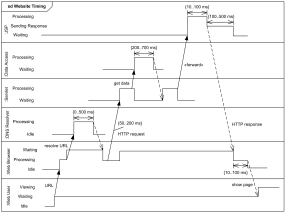
An example of timing diagram which shows some duration constraints for a fabricated website to evaluate how long web user should wait to see something rendered on his/her display.
After web user enters web page URL, the URL should be resolved to some IP address. DNS resolution can add some tangible waiting time to the response latency as perceived by user. Latency delays related to DNS resolution could range from 1 ms (local DNS cache) to several seconds.
With simple Model–View–Control (MVC) implementation, Java servlet gets control and requests some data from "model". Communication with data sources usually takes some discernible time. After data is received and processed, servlet forwards request processing to JSP ("view"). Buffered HTTP response is sent back to the browser.
Web browser takes some time to process HTTP response and HTML page to start rendering the page view to the web client. (Note, that after that it could take even more time for the web browser to request other resources like CSS, JavaScript, images, which is not shown on the diagram.)
Timing Diagram Example - User Experience Website Latency