UML Activity Diagram Examples
Here we provide several examples of UML activity diagrams:
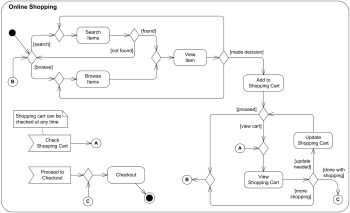
 Online shopping UML activity diagram
Purpose: An example of activity diagram for online shopping.
Summary: Online customer can browse or search items, view specific item, add it to shopping cart, view and update shopping cart, do checkout. User can view shopping cart at any time.
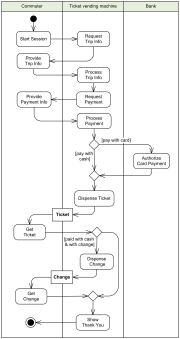
 Ticket vending machine
Purpose: An example of UML activity diagram describing behavior of the Purchase Ticket use case for a Ticket vending machine.
Summary: Activity is started by Commuter actor who needs to buy a ticket. Ticket vending machine will request trip information from Commuter. Based on the info machine will calculate payment due and request payment options. After payment is complete, ticket is dispensed to the Commuter.
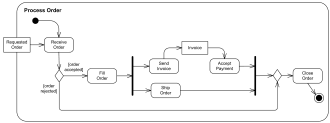
 Business flow - Process order
Purpose: An example of business flow UML activity diagram to process purchase order.
Summary: Requested order is input parameter of the activity. After order is accepted and all required information is filled in, payment is accepted and order is shipped.
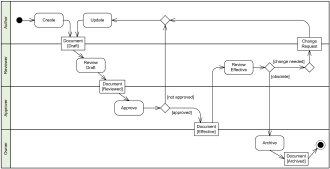
 Business flow - Document management process
Purpose: An example of UML activity diagram describing a Document Management Process. Some kind of formal and properly communicated document management process is usually required in any major corporation especially under a regulatory compliance.
Summary: Document is created, reviewed, updated, approved, and at some point archived. This activity diagram example shows responsibilities of different roles and a flow of document changes. Partitions represent different roles participating in the activity - Author, Reviewer, Approver, and Owner.
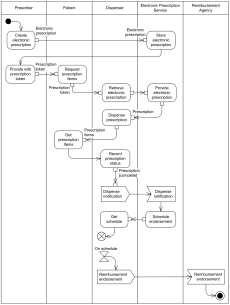
 Electronic prescription service
Purpose: Electronic prescriptions UML activity diagram example is based on documentation for the Electronic Prescription Service (EPS) R2 developed by the NHS Connecting for Health (NHS CFH) in England.
Summary: Prescribers could send prescriptions electronically to a pharmacy of the patient's choice where patient can pick it up. Dispenser retrieves electronic prescriptions from the EPS.
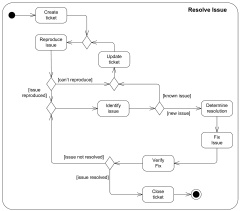
 Software design - Resolve issue
Purpose: An example of UML activity diagram to resolve an issue in software design.
Summary: After issue or error ticket is created by some authority and the issue was reproduced, issue is identified, resolution is determined, issue is fixed and verified, and ticket is closed, if issue was resolved.
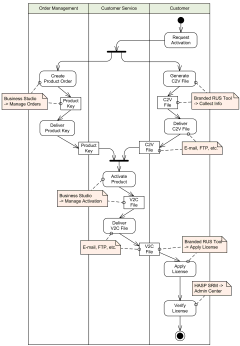
 Activation of Sentinel HASP SL provisional product UML activity diagram example
Purpose: An example of activity diagram describing manual activation of trial (provisional) product which was protected by Sentinel HASP SL software key of the Sentinel HASP - software protection and licensing security solution.
Summary: Customer has some trial product installed, for example, some game or tool, which has specific trial period and could have some limited features or options. After using the product for some time customer decides to activate product by requesting a permanent, full product license. Order Manager creates a new activation key for the product.
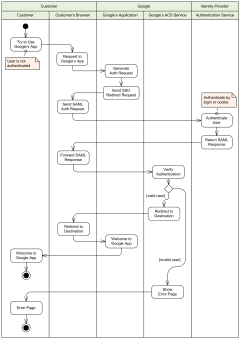
 Single Sign-On (SSO) for Google Apps
Purpose: An example of UML activity diagram which describes Single Sign-On (SSO) to Google Apps for customers using some hosted Google application, such as Gmail.
Summary: When a user attempts to use some hosted Google application, such as Gmail, Google generates a SAML authentication request and sends redirect request back to the user's browser. Redirect points to the specific identity provider. SAML authentication request contains the encoded URL of the Google application that the user is trying to reach.