Sequence Diagrams

Sequence diagram is the most common kind of interaction diagram, which focuses on the message interchange between a number of lifelines.

Sequence diagram describes an interaction by focusing on the sequence of messages that are exchanged, along with their corresponding occurrence specifications on the lifelines.

The following nodes and edges are typically drawn in a UML sequence diagram: lifeline, execution specification, message, combined fragment, interaction use, state invariant, continuation, destruction occurrence.

Major elements of the sequence diagram are shown on the picture below.
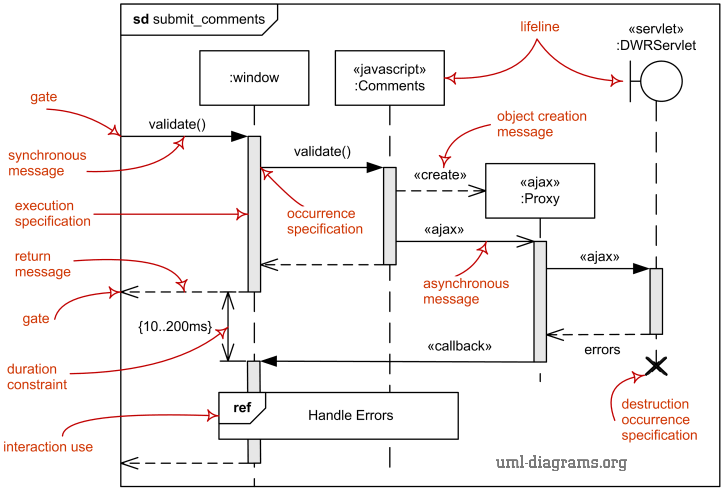
UML sequence diagram major elements.

Sequence diagram major elements.

You can find some sequence diagram examples here:

Lifeline

Lifeline is a named element which represents an individual participant in the interaction. While parts and structural features may have multiplicity greater than 1, lifelines represent only one interacting entity.

If the referenced connectable element is multivalued (i.e, has a multiplicity > 1), then the lifeline may have an expression (selector) that specifies which particular part is represented by this lifeline. If the selector is omitted, this means that an arbitrary representative of the multivalued connectable element is chosen.

A lifeline is shown using a symbol that consists of a rectangle forming its "head" followed by a vertical line (which may be dashed) that represents the lifetime of the participant.

Information identifying the lifeline is displayed inside the rectangle in the following format (slightly modified from what's in UML 2.4 standard):

lifeline-ident ::= [ connectable-element-name [ '[' selector ']' ]]   [ ':' class-name ] [ decomposition ] | 'self'
selector ::= expression
decomposition ::= 'ref' interaction-ident [ 'strict' ]

where class-name is the type referenced by the represented connectable element. Note that although the syntax allows it, lifeline-ident cannot be empty.

The lifeline head has a shape that is based on the classifier for the part that this lifeline represents. Usually the head is a white rectangle containing name of class.
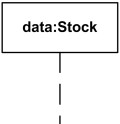
Lifeline data of class Stock.

Lifeline "data" of class Stock

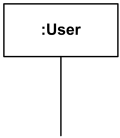
Anonymous lifeline of class User.

Anonymous lifeline of class User

Lifeline x selected with [k] of class X.

Lifeline "x" of class X is selected with selector [k]

If the name is the keyword self, then the lifeline represents the object of the classifier that encloses the Interaction that owns the Lifeline. Ports of the encloser may be shown separately even when self is included.

Message

Message is a named element that defines one specific kind of communication between lifelines of an interaction. The message specifies not only the kind of communication, but also the sender and the receiver. Sender and receiver are normally two occurrence specifications (points at the ends of messages).

Syntax for the message is:

message ::= [ attribute '=' ] signal-or-operation-name [ arguments ] [ ':' return-value ]  | '*'
arguments ::= '(' [argument  [ ',' argument]* ')'
argument ::= [ parameter-name '='] argument-valueattribute '=' out-parameter-name [ ':' argument-value ]  | ' -'

Arguments of a message could only be:

A message is shown as a line from the sender message end to the receiver message end. The line must be such that every line fragment is either horizontal or downwards when traversed from send event to receive event. The send and receive events may both be on the same lifeline. The form of the line or arrowhead reflects properties of the message.

Messages by Action Type

A message reflects either an operation call and start of execution or a sending and reception of a signal.

When a message represents an operation call, the arguments of the message are the arguments of the operation. When a message represents a signal, the arguments of the message are the attributes of the signal.

Depending on the type of action that was used to generate the message, message could be one of:

Synchronous Call

Synchronous call typically represents operation call - send message and suspend execution while waiting for response. Synchronous call messages are shown with filled arrow head.

Web Client searches Online Bookshop and waits for results.

Web Client searches Online Bookshop and waits for results.

Asynchronous Call

Asynchronous call - send message and proceed immediately without waiting for return value. Asynchronous messages have an open arrow head.

Service starts Task and proceeds in parallel without waiting.

Service starts Task and proceeds in parallel without waiting.

Asynchronous Signal

Asynchronous signal message corresponds to asynchronous send signal action.

Create Message

Create message is sent to lifeline to create itself. Note, that it is weird but common practice in OOAD to send create message to a nonexisting object to create itself. In real life, create message is sent to some runtime environment.

Create message is shown as a dashed line with open arrowhead (same as reply), and pointing to created lifeline's head.

Online Bookshop creates Account.

Online Bookshop creates Account.

Delete Message

Delete message (called stop in previous versions of UML) is sent to terminate another lifeline. The lifeline usually ends with a cross in the form of an X at the bottom denoting destruction occurrence.

UML 2.4 specification provides neither specific notation for delete message nor a stereotype. Until they provide some notation, we can use custom «destroy» stereotype.

Online Bookshop terminates Account.

Online Bookshop terminates Account.

Reply Message

Reply message to an operation call is shown as a dashed line with open arrow head (looks similar to creation message).

Web Client searches Online Bookshop and waits for results to be returned.

Web Client searches Online Bookshop and waits for results to be returned.

Messages by Presence of Events

Depending on whether message send event and receive events are present, message could be one of:

The semantics of a complete message is the trace <sendEvent, receiveEvent>. Both sendEvent and receiveEvent are present.

Unknown message - both sendEvent and receiveEvent are absent (should not appear).

Lost Message

Lost Message is a message where the sending event is known, but there is no receiving event. It is interpreted as if the message never reached its destination. The semantics is the trace <sendEvent>, receiveEvent is absent. Lost messages are denoted with as a small black circle at the arrow end of the message.

Web Client sent search message which was lost.

Web Client sent search message which was lost.

Found Message

Found Message is a message where the receiving event is known, but there is no (known) sending event. It is interpreted as if the origin of the message is outside the scope of the description. This may for example be noise or other activity that we do not want to describe in detail. The semantics is simply the trace: <receiveEvent>, while send event is absent.

Found Messages are denoted with a small black circle at the starting end of the message.

Online Bookshop gets search message of unknown origin.

Online Bookshop gets search message of unknown origin.

Gate

A gate is a message end, connection point for relating a message outside of an interaction fragment with a message inside the interaction fragment.

The purpose of gates and messages between gates is to specify the concrete sender and receiver for every message. Gates play different roles:

The gates are named implicitly or explicitly. Implicit gate name is constructed by concatenating the direction of the message ("in" or "out") and the message name, e.g. in_search, out_read.

Gates are notated just as message connection points on the frame.

Interaction Fragment

Interaction fragment is a named element representing the most general interaction unit. Each interaction fragment is conceptually like an interaction by itself.

There is no general notation for an interaction fragment. Its subclasses define their own notation.

Examples of interaction fragments are:

Occurrence

Occurrence (complete UML name - occurrence specification, i.e. "event description") is interaction fragment which represents a moment in time (event) at the beginning or end of a message or at the beginning or end of an execution.

An occurrence specification is one of the basic semantic units of interactions. The meanings of interactions are specified by sequences of occurrences described by occurrence specifications.

Each occurrence specification appears on exactly one lifeline. Occurrence specifications of a lifeline are ordered along the lifeline.

Occurrence specification has no notation and is just a point at the beginning or end of a message or at the beginning or end of an execution specification.

Examples of occurrences are:

Message Occurrence

Message occurrence (complete UML name - message occurrence specification) is occurrence which represents such events as sending and receiving of signals or invoking or receiving of operation calls.

Destruction Occurrence

Destruction occurrence is a message occurrence which represents the destruction of the instance described by the lifeline. It may result in the subsequent destruction of other objects that this object owns by composition. No other occurrence may appear below the destruction event on a given lifeline.

Complete UML name of the occurrence is destruction occurrence specification. Until UML 2.4 it was called destruction event, and earlier - stop.

The destruction of instance is depicted by a cross in the form of an X at the bottom of a lifeline.
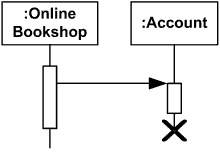
Account lifeline is terminated.

Account lifeline is terminated

Execution Occurrence

Execution occurrence (complete UML name - execution occurrence specification) is an occurrence which represents moments in time at which actions or behaviors start or finish.

Execution occurrence references exactly one execution specification which describes the execution that is started or finished at this execution occurrence.
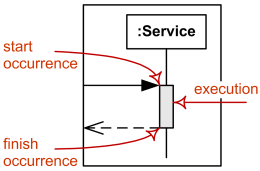
Duration of an execution represented by two execution occurrences - start and finish.

Duration of an execution is represented
by two execution occurrences - start and finish.

Execution

Execution (full name - execution specification, informally called activation) is interaction fragment which represents a period in the participant's lifetime when it is

Note, that the execution specification includes the cases when behavior is not active, but just waiting for reply. The duration of an execution is represented by two execution occurrences - the start occurrence and the finish occurrence.

Execution is represented as a thin grey or white rectangle on the lifeline.

Execution specification represented as grey rectangle on the Service lifeline.

Execution specification shown as grey rectangle on the Service lifeline.

Execution specification can be represented by a wider labeled rectangle, where the label usually identifies the action that was executed.
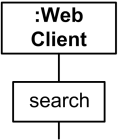
Execution Specification represented as wider rectangle labeled as action.

Execution Specification represented as wider rectangle labeled as action.

For execution specifications that refer to atomic actions such as reading attributes of a signal (conveyed by the message), the action symbol may be associated with the reception occurrence specification with a line in order to emphasize that the whole action is associated with only one occurrence specification (and start and finish associations refer to the same occurrence specification).

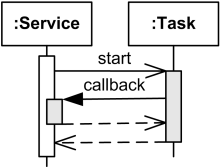
Overlapping execution specifications on the same lifeline are represented by overlapping rectangles.
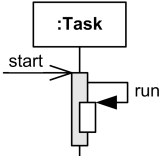
Overlapping execution specifications on the same lifeline - message to self.
Overlapping execution specifications on the same lifeline - message to self.

Overlapping execution specifications on the same lifeline - callback message.

Overlapping execution specifications on the same lifeline - callback message.

State Invariant

A state invariant is an interaction fragment which represents a runtime constraint on the participants of the interaction. It may be used to specify different kinds of constraints, such as values of attributes or variables, internal or external states, etc.

The constraint is evaluated immediately prior to the execution of the next occurrence specification such that all actions that are not explicitly modeled have been executed. If the constraint is true, the trace is a valid trace, otherwise the trace is an invalid trace.

State invariant is usually shown as a constraint in curly braces on the lifeline.
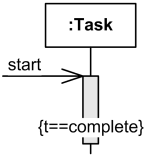
Attribute t of Task should be equal to complete.

Attribute t of Task should be equal to complete.

It could also be shown as a state symbol representing the equivalent of a constraint that checks the state of the object represented by the lifeline. This could be either the internal state of the classifier behavior of the corresponding classifier or some external state based on a "black-box" view of the lifeline.
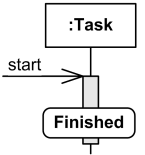
Task should be in Finished state.

Task should be in Finished state.

State invariant can optionally be shown as a note associated with an occurrence specification.

Combined Fragment

Combined fragment is an interaction fragment which defines a combination (expression) of interaction fragments. A combined fragment is defined by an interaction operator and corresponding interaction operands. Through the use of combined fragments the user will be able to describe a number of traces in a compact and concise manner.

Combined fragment may have interaction constraints also called guards in UML 2.4.

Interaction operator could be one of:

Interaction Constraint

An interaction constraint is a constraint used in interactions - a Boolean expression that guards an operand in a combined fragment.

An interaction constraint is shown in square brackets covering the lifeline where the first event occurrence will occur, positioned above that event, in the containing interaction or interaction operand.

UML 2.4 often refers to interaction constraint as a guard.

Alternatives

The interaction operator alt means that the combined fragment represents a choice or alternatives of behavior. At most one of the operands will be chosen. The chosen operand must have an explicit or implicit guard expression that evaluates to true at this point in the interaction.

An implicit true guard is implied if the operand has no guard.

An operand guarded by else means a guard that is the negation of the disjunction of all other guards. If none of the operands has a guard that evaluates to true, none of the operands are executed and the remainder of the enclosing interaction fragment is executed.

Interaction operator alt example.

Call accept() if balance > 0, call reject() otherwise.

Option

The interaction operator opt means that the combined fragment represents a choice of behavior where either the (sole) operand happens or nothing happens. An option is semantically equivalent to an alternative combined fragment where there is one operand with non-empty content and the second operand is empty.

Interaction operator opt example.

Post comments if there were no errors.

Loop

The interaction operator loop means that the combined fragment represents a loop. The loop operand will be repeated a number of times. The loop construct represents a recursive application of the seq operator where the loop operand is sequenced after the result of earlier iterations.

UML 2.4 specification provides weird description of the loop operator with odd examples. I will try to extract here some sense from that.

Loop could be controlled by either or both iteration bounds and a guard.

Loop operand could have iteration bounds which may include a lower and an upper number of iterations of the loop. Textual syntax of the loop is:

loop-operand ::= loop [ '(' min-int [ ',' max-int ] ')' ]
min-int ::= non-negative-integer
max-int ::= positive-integer | '*'

If loop has no bounds specified, it means potentially infinite loop with zero as lower bound and infinite upper bound.

Potentially infinite loop.

Potentially infinite loop.

If only min-int is specified, it means that upper bound is equal to the lower bound, and loop will be executed exactly the specified number of times.

Loop to execute exactly 10 times.

Loop to execute exactly 10 times.

If max-int is specified, it should be greater than or equal to min-int. Loop will iterate minimum the min-int number of times and at most the max-int number of times.

Besides iteration bounds loop could also have an interaction constraint - a Boolean expression in square brackets. To add to the other confusions, UML 2.4 also calls both of them guards.

UML tries to shuffle the simplest form of for loop and while loop which causes weird UML 2.3 loop semantics on p.488 [UML 2.3 - Superstructure]: "after the minimum number of iterations have executed and the Boolean expression is false the loop will terminate". This is clarified - though with opposite meaning - on the next page as "the loop will only continue if that specification evaluates to true during execution regardless of the minimum number of iterations specified in the loop."

Loop will execute minimum 5 times max 10 times unless guard is false.

We may guess that as per UML 2.3, the loop is expected to execute
minimum 5 times and no more than 10 times.
If guard condition [size<0] becomes false loop terminates
regardless of the minimum number of iterations specified.
(Then why do we need that min number specified?!)

Break

The interaction operator break represents a breaking or exceptional scenario that is performed instead of the remainder of the enclosing interaction fragment.

A break operator with a guard is chosen when the guard is true. In this case the rest of the directly enclosing interaction fragment is ignored. When the guard of the break operand is false, the break operand is ignored and the rest of the enclosing interaction fragment proceeds.

Break enclosing loop if y>0.

Break enclosing loop if y>0.

A combined fragment with the operator break should cover all lifelines of the enclosing interaction fragment.

Note, UML allows only one level - directly enclosing interaction fragment - to be abandoned. This could become really annoying if double loop or loop with other combined fragments should be broken.

UML 2.3 states that when break operand has no guard, the choice between the break operand and the rest of the enclosing interaction fragment is done "non-deterministically" which most likely means "unpredictable". Don't use break without guard.

Parallel

The interaction operator par defines potentially parallel execution of behaviors of the operands of the combined fragment. Different operands can be interleaved in any way as long as the ordering imposed by each operand is preserved.

Set of traces of the parallel operator describes all the possible ways or combinations that occurrence specifications of the operands may be interleaved without changing the order within each operand.

Search Google, Bing and Ask in any order, possibly parallel.

Search Google, Bing and Ask in any order, possibly parallel.

Parallel combined fragment has notational shorthand for the common situations where the order of events on one lifeline is insignificant. In a coregion area of a lifeline restricted by horizontal square brackets all directly contained fragments are considered as separate operands of a parallel combined fragment.

Coregion - search Google, Bing and Ask in any order, possibly parallel.

Coregion - search Google, Bing and Ask in any order, possibly parallel.

Strict Sequencing

The interaction operator strict requires a strict sequencing (order) of the operands on the first level within the combined fragment.

Search Google, Bing and Yahoo in the strict sequential order.

Search Google, Bing and Yahoo in the strict sequential order.

Operands of lower levels within the contained combined fragment will not directly be compared with other occurrence specifications of the enclosing combined fragment. Notationally, this means that the vertical coordinate of the contained fragments is significant throughout the whole scope of the combined fragment and not only on one lifeline.

Weak Sequencing

The interaction operator seq means that the combined fragment represents a weak sequencing between the behaviors of the operands.

Weak sequencing is defined by the set of traces with these properties:

Weak sequencing reduces to a parallel merge when the operands are on different sets of participants. Weak sequencing reduces to strict sequencing when the operands work on the same participant.

Search Google, Bing and Yahoo in the strict sequential order.

Search Google possibly parallel with Bing and Yahoo, but search Bing before Yahoo.

Critical Region

The interaction operator critical defines that the combined fragment represents a critical region. A critical region is a region with traces that cannot be interleaved by other occurrence specifications (on the lifelines covered by the region). This means that the region is treated atomically by the enclosing fragment and can't be interleaved, e.g. by parallel operator.

Add() or remove() could be called in parallel, but each one should run as a critical region.

Add() or remove() could be called in parallel,
but each one should run as a critical region.

Ignore

Semantics and the purpose of the interaction operator ignore is obscure. UML 2.3 defines its meaning as "there are some message types that are not shown within this combined fragment. These message types can be considered insignificant and are implicitly ignored if they appear in a corresponding execution. Alternatively, one can understand ignore to mean that the message types that are ignored can appear anywhere in the traces."

On the other hand, explanations to the Figure 14.25 on p. 530 [UML 2.3 - Superstructure] are that this kind of interaction could be used to specify a test of an existing system. At the runtime the messages ignored in tests "will of course be handled in some manner by the running system".

The list of ignored messages follows the operand enclosed in a pair of curly braces "{" and "}". Ignore operation is typically combined with other operations such as "assert ignore {m, s}."

Ignore get and set messages, if any.

Ignore get() and set() messages, if any.

Consider

The interaction operator consider defines which messages should be considered within this combined fragment, meaning that any other message will be ignored.

The list of considered messages follows the operand enclosed in a pair of curly braces "{" and "}". Consider operation is typically combined with other operations such as "assert consider {m, s}."

Consider only add() or remove() messages, ignore any other.

Consider only add() or remove() messages,
ignore any other.

Assertion

The interaction operator assert means that the combined fragment represents the assertion that the sequences of the assert operand are the only valid continuations (must be satisfied by a correct design of the system). All other continuations result in an invalid trace.

Commit() message should occur, following with state invariant evaluation.

Commit() message should occur at this point,
following with evaluation of state invariant.

Negative

The interaction operator neg describes combined fragment of traces that are defined to be negative (invalid). Negative traces are the traces which occur when the system has failed. All interaction fragments that are different from the negative are considered positive, meaning that they describe traces that are valid and should be possible.

Should we receive back timeout message, it means the system has failed.

Should we receive back timeout message,
it means the system has failed.

Interaction Use

Interaction use is an interaction fragment which allows to use (or call) another interaction. Large and complex sequence diagrams could be simplified with interaction uses. It is also common reusing some interaction between several other interactions.

Referenced interaction has formal gates. Interaction use provides a set of actual gates that must match the formal gates of the interaction.

Interaction use works as:

The interaction use is shown as a combined fragment with operator ref.
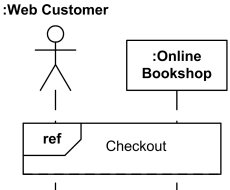
Web customer and Bookshop use (reference) interaction Checkout.

Web customer and Bookshop use (reference) interaction Checkout.

The syntax of the interaction use of the ref operator is:

interaction-use ::= [ attribute-name '=' ] [ collaboration-use   '.' ]   interaction-name [ io-arguments ]   [ ':' return-value ]
io-arguments ::= '(' io-argument   [ ',' io-argument ]*   ')'
io-argument ::= in-argument   |   'out'   out-argument

The attribute-name refers to an attribute of one of the lifelines in the interaction that will receive interaction result. Note, that this restricts results of interactions to be assigned only to attributes. In real life, results of a method call could be assigned to a variable from calling method.

The collaboration-use is an identification of collaboration use that binds lifelines of a collaboration. The interaction name is in that case within that collaboration.

The io-arguments is list of in and/or out arguments of the interaction.
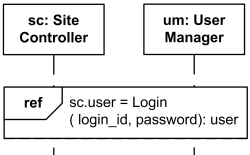
Use Login interaction to authenticate user and assign result back to the user attribute of Site Controller.

Use Login interaction to authenticate user and assign result back to the user attribute of Site Controller.

One constraint imposed by UML specification that is sometimes difficult to follow is that the interaction use must cover all involved lifelines represented on the enclosing interaction. This means that all those lifelines should be somehow located near each other. If we have another interaction use on the same diagram it could be very tricky to rearrange all involved lifelines as required by UML.

Comments
blog comments powered by Disqus